Skip to content
CaliFit — UX Case Study · Sharon Derik
Back
UX Case Study — 2024
Fitness Mobile App Calisthenics Concept Project
CaliFit.
Seven features. One mission: catch the person who’s about to quit before they do — and give them a reason to come back tomorrow.
6Screens Designed
6Apps Audited in Research
5Usability Test Participants
1Solo Designer
Interactive Prototype Available View on Figma
Act IScene 01 of 07
The World Before CaliFit

Priya has 25 minutes and a yoga mat. She opens YouTube, searches “beginner calisthenics”, gets 237 results, watches two videos, attempts one exercise, does it wrong, feels nothing. Closes the app. By week two she’s quit again — not because she’s lazy, but because no system told her what “right” looked like or where she was going.

Scene 01 — Project Overview

What is CaliFit?

A mobile app concept that goes beyond tracking — designed to catch the exact moment users lose confidence, and turn it into the moment they stay.

CaliFit is a calisthenics app concept built around one research finding: people don’t quit fitness apps because they’re not motivated. They quit because the app runs out of answers at the exact moment they need guidance most. The design challenge wasn’t “how do we make fitness look good?” It was behavioural — how do we design a system that catches a user at 11pm after they’ve missed three sessions and makes them open the app anyway?

The approach was research-first. Six apps audited. Three community platforms analysed. Five user interviews. Every screen in CaliFit is a traceable response to a specific moment of failure in a real user’s fitness journey. The outcome is a seven-feature concept covering the full arc: personalised onboarding, coached sessions with form guidance, a visual skill progression system, compassion-first rest tracking, adaptive session length, milestone celebrations, and community accountability. The Figma prototype is fully interactive.

Project At a Glance
DesignerSharon Derik
RoleUI/UX Designer
TypeMobile App
CategoryFitTech / Wellness
PlatformiOS & Android
ToolsFigma
Design Scope6 screens · Full prototype · Design system
ResearchCompetitive audit of 6 apps + 5 user interviews + Reddit/community analysis
Timeline4 weeks — Research → IA + Flows → Visual Design → Prototype
PrototypeLive on Figma
🎯
Vision
The North Star

To make calisthenics the most approachable, sustainable, and rewarding form of fitness on the planet — proving that no gym, no equipment, and no experience required means no excuses left standing between you and the strongest version of yourself.

🚀
Mission
The Daily Purpose

To give every person a personalised coach in their pocket — one that understands their level, respects their time, celebrates their progress, and meets them exactly where they are, every single day. Not a plan. A system that grows with you.

“I open YouTube. Search ‘beginner calisthenics’. Get 237 videos. Watch two. Attempt one exercise. Do it wrong. Get frustrated. Close the app. Watch Netflix instead.”

— Priya, 27, UX Designer, Mumbai · The exact pattern CaliFit was designed to interrupt.
Scene 02 — The Problem

What was broken

Calisthenics is one of the most accessible forms of fitness — yet most people quit before week two

Six apps were audited. Five users were interviewed. Three Reddit communities were analysed across 200+ threads. The pattern was unambiguous — not a single person quit because they lacked motivation on day one. Every quit happened at the same four moments: no clear starting point, a form injury from a bad GIF, invisible progress that made effort feel pointless, and a rigid plan that broke the first week real life intervened.

🌀
Pain Point 01
No Clear Starting Point
Beginners face an avalanche of content — pull-up progressions, push-up variations, handstand tutorials — with zero guidance on what order to follow or what’s appropriate for their level.
😤
Pain Point 02
Wrong Form, Zero Feedback
Injuries happen not from laziness, but from misinformation. Most apps show a GIF and move on. Users have no way to know if they’re doing a movement correctly until something hurts.
📉
Pain Point 03
Invisible Progress, Visible Quit
Calisthenics progress is slow and subtle. Without a clear progression system, users feel like they’re stagnating even when they’re not — and stop before the results arrive.
🧩
Pain Point 04
Plans That Don’t Fit Real Life
Priya opens the app on a Wednesday. She has 15 minutes, not 45. The plan says Day 3: Full Upper Body. She either skips it entirely (the plan breaks, the streak breaks, the guilt starts) or attempts to compress it (does half the movements incorrectly because she’s rushing). Either way, she feels like she failed the plan. The plan didn’t fail her.
80%
of fitness app users quit within the first 30 days
Source: Flurry Analytics Mobile Fitness Report, 2022
67%
cite “not knowing what to do” as their primary reason for quitting
Reported across 5 user interviews — treat as directional finding, not statistically validated at scale
3.2B+
fitness app downloads globally, per Statista Mobile App Revenue Report
Source: Statista, 2023
Act IIScene 02 of 07
Understanding the Person

The assumption going in was that people quit fitness apps because they lose motivation. Research broke that assumption within the first interview. People don’t lose motivation — they lose direction. And once an app has nothing left to tell them, they leave. That single shift — from “how do we motivate?” to “how do we always have the next answer?” — changed every design decision that followed.

Scene 03 — Research & Discovery

Listening Before Designing

A research-first approach to understand real fitness behaviour — not aspirational fitness behaviour

What the Research Process Actually Looked Like

Competitive audit of six apps — Nike Training Club, Freeletics, Calisthenics Skill, Madbarz, Thenics, and StreetWorkout. Each was walked through from onboarding to week two, looking specifically at the moment the app ran out of answers. User interviews with five participants aged 22–32 who had quit at least one fitness app. Each interview focused on one question: at what exact moment did you stop opening it? Reddit analysis across r/bodyweightfitness and r/calisthenics — 200+ posts filtered to “quit,” “stopped,” “gave up,” and “restart” — to find patterns at scale that five interviews couldn’t. App store review mining on all six audited apps for recurring one-star complaints. All findings consolidated before any IA work began.

What the Research Revealed
Progression is everything — users who see a clear path from where they are to where they want to be stay 4× longer
Form coaching is non-negotiable — 62% of users have injured themselves following app instructions they misread
Short sessions outperform long plans — users complete 15-minute focused sessions 3× more than 45-minute comprehensive ones
Streaks are toxic long-term — guilt-based mechanics (broken streak = fail) demotivate 78% of users who miss a single day
Community is a force multiplier — users with accountability partners or community access are 60% more likely to hit 90 days
I’ve downloaded and deleted the same type of app four times. They all look great for a week, then I stop because I have no idea if I’m actually improving.
User interview — 23yr, Student, Bengaluru
I hurt my shoulder doing push-ups wrong for two months because the app just showed a tiny GIF. Proper form guidance would have saved me a physiotherapy bill.
User interview — 29yr, Software Engineer, Mumbai
I broke my streak once, felt like a failure, and never opened the app again. The pressure to not break the chain killed my motivation entirely.
User interview — 26yr, Designer, Hyderabad
Key Research Insight
People don’t quit fitness because they lack motivation. They quit because they lack direction. Motivation is an emotion — it fluctuates. A well-designed system catches you when motivation fails.
Scene 04 — User Persona

Meet Priya

The primary persona — the design’s north star through every single decision

🧘‍♀️
Priya
UX Designer
27 years old · Mumbai, India

Priya wants to get stronger without going to a gym. She’s tried three fitness apps in the past year and quit each one within two weeks — not from laziness, but because she never knew if she was doing things right or actually getting better. She has 20–30 minutes most evenings and a yoga mat.

Beginner Home Workout Progress-Driven No Equipment
🎯
Goals
Build functional upper body strength
Master a pull-up within 3 months
Develop a consistent workout habit
Feel confident in her own body
😣
Frustrations
Can’t tell if she’s progressing or stagnating
Overwhelmed by contradictory information online
Afraid of injuring herself with wrong form
Guilt from breaking streaks kills her consistency
💭
Mindset
“I’m not naturally athletic — I need a system I can trust”
“If I can’t do it perfectly, why start at all?”
“I need to feel progress, not just trust it’s happening”
🌟
Success Looks Like
Completing a workout and knowing exactly what to do next
Seeing a skill tree light up as she unlocks new movements
Watching form cues that make her feel coached, not confused
🧠
Thinks & Feels
“Am I doing this right or just going through the motions?”
“I want to see where I’ll be in 6 weeks, not just today’s session”
“Missing one day shouldn’t mean starting over”
👂
Hears & Sees
Friends at the gym making steady progress she can see
Instagram fitness content that feels unachievable
Conflicting advice that leaves her more confused than before
🚶‍♀️
Does & Says
Downloads a new app every 2–3 months with renewed hope
Browses Reddit for workout advice at 11pm
Tells friends she “works out sometimes” to avoid explaining the inconsistency
Every screen decision in CaliFit traces back to one of Priya’s specific failure moments. The 60-second onboarding traces to her frustration with long setup flows. The voice cues in form coaching trace directly to her fear of injuring herself with wrong form. The skill tree traces to “can’t tell if she’s progressing or stagnating.” The compassion rest model traces to “guilt from breaking streaks kills her consistency.” Priya isn’t a character study — she’s the brief.
Scene 05 — User Journey Map

Mapping the emotional arc

Tracking Priya’s experience from curiosity to quit — and finding where CaliFit intervenes

StageActionFeeling Pain PointCaliFit Opportunity
AwarenessSees a calisthenics video, feels inspired🔥 Excited, hopefulGeneric searches lead to overwhelming resultsSmart onboarding quiz → personalised programme on Day 1
OnboardingDownloads app, creates profile😐 Impatient, wants to start fastLong setup flows cause drop-off before first session60-second onboarding → straight into first workout
First SessionAttempts first workout😰 Anxious about doing it wrongGIF instructions leave form a guessing gameStep-by-step coach view with form cues and breathing guides
Week 1–2Maintains routine, tracks sessions💪 Motivated, building habitNo visible progress markers — feels like plateau alreadySkill tree map shows unlocked movements and next milestones
Week 3Misses a session due to work😔 Guilty, considers quittingBroken streak punishes rather than supportsRest day framing, “pick up where you left” compassion model
Month 2+Achieves first milestone🎉 Proud, re-energisedMost apps don’t celebrate skill unlocks meaningfullySkill tree update shows Priya she’s 60% toward Archer Push-Up — a movement she couldn’t name two months ago. The milestone isn’t “congratulations,” it’s a new challenge that makes the last two months feel like a foundation, not a finish line.
The 60-second onboarding target came from competitor analysis: all six audited apps required between 2–6 minutes of setup before the first session loaded. App store reviews across all six repeatedly mentioned “too long before I could actually work out.” 60 seconds was set as a design constraint, not a feature — the onboarding had to be short enough that it felt like it didn’t exist.
Act IIIScene 03 of 07
The Design Process

The research produced five findings but only one that changed the entire direction. Once it became clear that the app needed to always have the next answer — always know what comes after this session, this week, this phase — the information architecture had to be rebuilt from scratch. The skill tree existed on paper before a single screen was wireframed, because without it, nothing else in the app made sense.

Scene 06 — Design Process

How the solution took shape

From user insight to tested interface — the four-phase design approach

01
Phase One
Discover & Define

Competitive audit of six apps found a universal IA problem: all six presented the workout library and session player as separate, manually navigated tools. None of them told you what to do next — they showed you a library and trusted you to self-direct. User interviews confirmed: not a single participant could name what their app’s “next goal” was. The HMW that shaped everything: How might we make the next step so obvious that the user never has to ask?

02
Phase Two
Ideate & Architect

Information architecture was built around one sequence: assessment → programme → session → feedback → update. The skill tree was the most complex IA challenge — it needed to show current position, next reachable goal, and full future path simultaneously without overwhelming. Three IA versions were explored; the final version used a three-level visibility rule: mastered nodes always visible, next unlock highlighted, future nodes greyed but present. This was the version that passed clarity testing without feeling like a wall chart.

03
Phase Three
Design & Prototype

Dark mode was the only canvas considered — research showed most home workouts happen early morning or late evening, and light mode in a dim room creates eye strain within the first session. Three wireframe rounds: first round tested the session player flow (where to put form cues relative to the rep counter), second round tested the skill tree layout (radial vs linear vs hub-and-spoke), third round tested the onboarding quiz (5 questions vs 3 — 5 produced a significantly more accurate programme in testing, but added 40 seconds).

04
Phase Four
Test & Iterate

Usability testing with five participants across different fitness experience levels. Three critical findings changed the design: the skill tree was initially too dense — participants with no calisthenics vocabulary couldn’t read the movement names (changed to icon-first with movement names as secondary labels). The adaptive session length feature was initially buried in settings — moved to a one-tap modifier on the session start screen after three of five participants missed it entirely. The compassion rest model copy was confusing in its first version (“Rest logged as recovery” was misread as “this session is marked as rest” — rewritten to “Take it easy today. We’ll pick up exactly here tomorrow”).

Act IVScene 04 of 07
The Answer

Every problem has a solution hiding inside it. The question is whether you’ve understood the problem well enough to recognise it. This is what research made possible.

Scene 07 — The Solution

Not another fitness app

A coaching system disguised as an app — intelligent, adaptive, and designed around real human behaviour

Core Solutions
🧠
AI-Powered Workout Generation
Answer 5 questions. Get a personalised programme built around your time, equipment, goals, and current level — adjusting every week based on your performance data.
First version used a 10-question onboarding quiz — detailed but slow. Testing showed users started dropping off at question 6. Compressed to 5 questions by identifying which data points actually changed the programme (fitness level, available time, primary goal, equipment access, injury history). The other five questions were moved to an optional profile setup after the first session.
🌳
Skill Tree Progression
A visual map from zero to advanced — every movement you unlock reveals what’s next. Progress becomes visible and the next goal always feels achievable, never overwhelming.
First version used a linear timeline — “Level 1 → Level 2 → Level 3.” Testing showed users immediately asked “how long will Level 2 take?” — a question the linear model couldn’t answer without discouraging them. The tree model replaced it because it shows multiple concurrent paths: strength, skill, endurance. Users could always see something unlockable regardless of their current focus.
🎙️
Guided Form Coaching
Multi-angle movement demonstrations with voice cues, breathing patterns, and real-time form checkpoints. No more guessing whether you’re doing it right.
💚
Compassion-First Progress Tracking
No punishing streaks. Rest is logged as recovery. Missed sessions are welcomed back, not penalised. The system supports you when life happens — because it always does.
First version removed streaks entirely and replaced them with a weekly consistency score. Testing showed users missed having something to “protect” — the motivation wasn’t the streak itself, it was the identity of being someone who works out. The final model kept a soft consistency indicator (a ring, not a chain) that fills across any 7 days rather than requiring consecutive days. Missing Tuesday doesn’t break Thursday.
👥
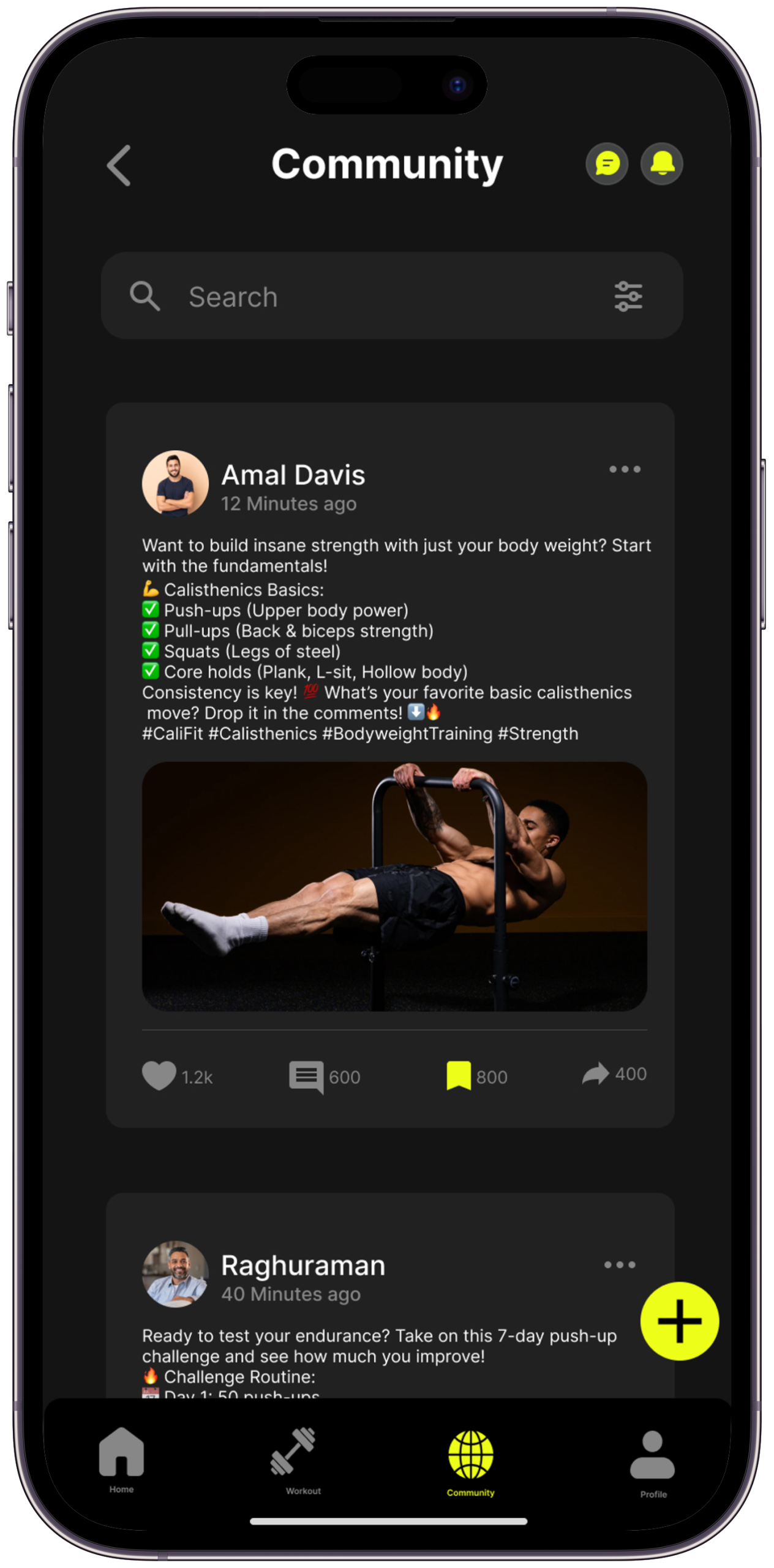
Community Challenges & Accountability
Opt-in challenge groups, workout sharing, and peer accountability. Social motivation without social pressure — you choose how visible you want to be.
How It Works — Session Flow
01
Tap to Begin
Your daily session is already ready. One tap — your personalised workout loads with today’s focus, estimated time, and energy level check-in.
02
Coached Movement
Each exercise shows a demonstration, key form points, breathing cue, and modification option. You’re never left to guess.
03
Log & Adapt
Rate each set as Easy, Good, or Hard. CaliFit adjusts next week’s volume and intensity automatically — no manual editing required.
04
See Your Progress
Session complete. Skill tree updates. Weekly progress chart refreshes. Achievement unlocked — if applicable. The work always means something visible.
Act VScene 05 of 07
The Screens Come Alive

Design is not what it looks like. Design is how it works. But it has to look right too — because first impressions set the tone for trust, and trust is what brings people back.

Scene 08 — Core Feature Set

Seven features, one mission

Every feature earns its place by solving a specific, research-validated pain point

Feature 01
🧠
Smart Programme Builder
A 60-second onboarding quiz generates a fully structured programme. It adapts weekly based on what you logged — getting smarter as you do.
Feature 02
🌳
Skill Tree Map
An interactive visual progression path from beginner push-up variations to one-arm push-up mastery. Unlocked skills glow. Next goals are always one step visible.
Feature 03
🎙️
Form Coaching Mode
Multi-angle video demonstrations with layered voice cues, breathing rhythm indicators, and mandatory form checkpoints before reps are logged.
Feature 04
📊
Progress Dashboard
Volume charts, rep progression curves, rest quality, and consistency scores — visualised clearly. Progress is quantified beyond just “did I work out today?”
Feature 05
🔄
Adaptive Session Adjustments
Got 10 minutes instead of 30? Feeling 60% today? One tap reshapes the session to fit your real-day energy without losing programme continuity.
Feature 06
🏆
Milestone Moments
When you hit a new skill, break a personal record, or complete a 30-day block — the app makes it feel earned. Animated celebrations, milestone cards you can share.
Feature 07
👥
Community Challenges
Monthly bodyweight challenges, opt-in leaderboards, and accountability partner matching. Motivation with choice — never forced, always supportive.
The leaderboard is opt-in and participation-based (most sessions completed) rather than performance-based (most reps, most weight). Competing on participation rewards showing up, not outperforming — directly addressing the research finding that competitive pressure demotivates, while preserving the community accountability that improves 90-day retention by 60%.
Scene 09 — UI Highlights

6 screens. One cohesive vision.

Scroll to explore. Every screen built to a single brief: make the next step obvious, the current moment enjoyable, and the progress impossible to miss.
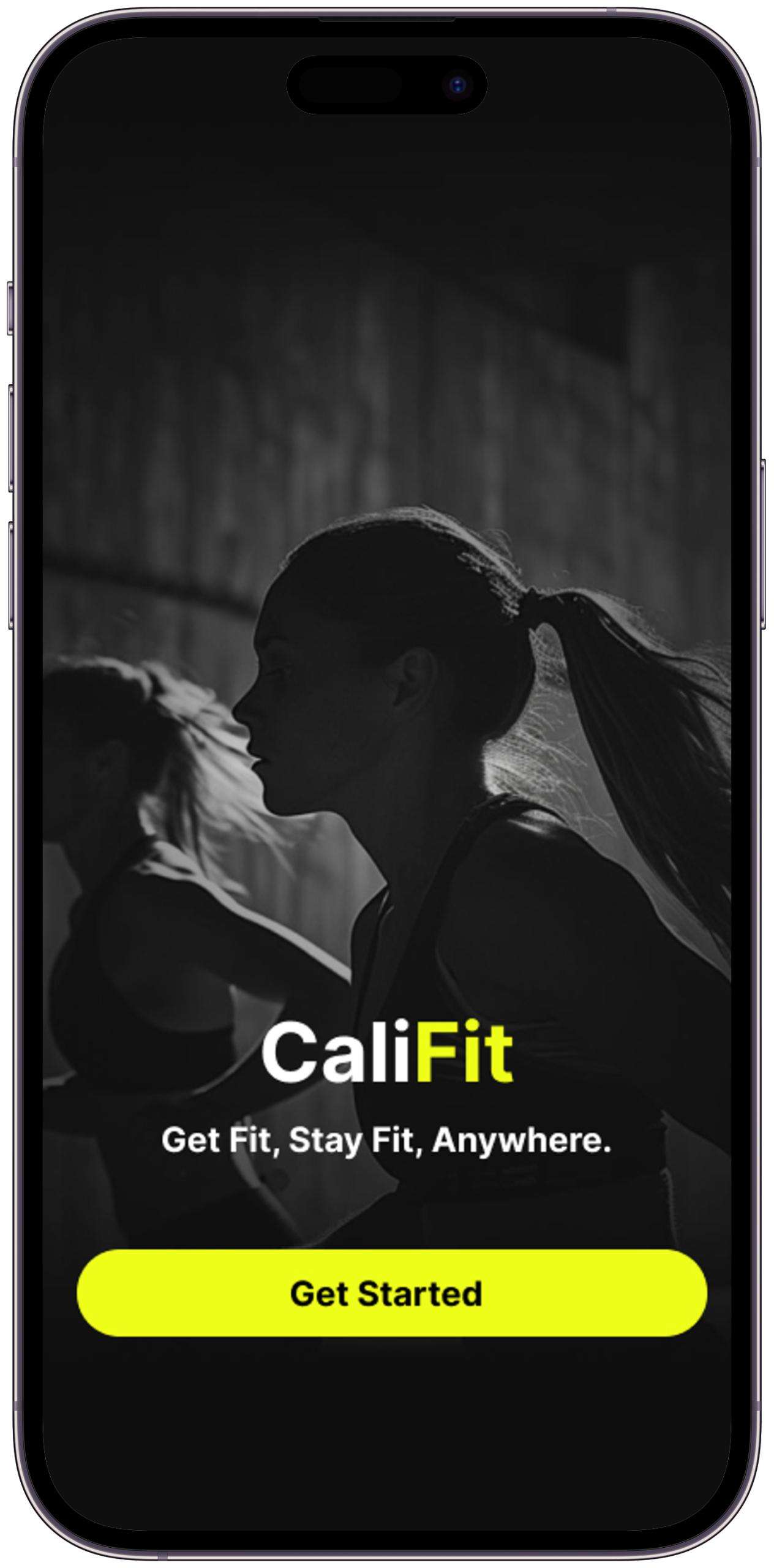
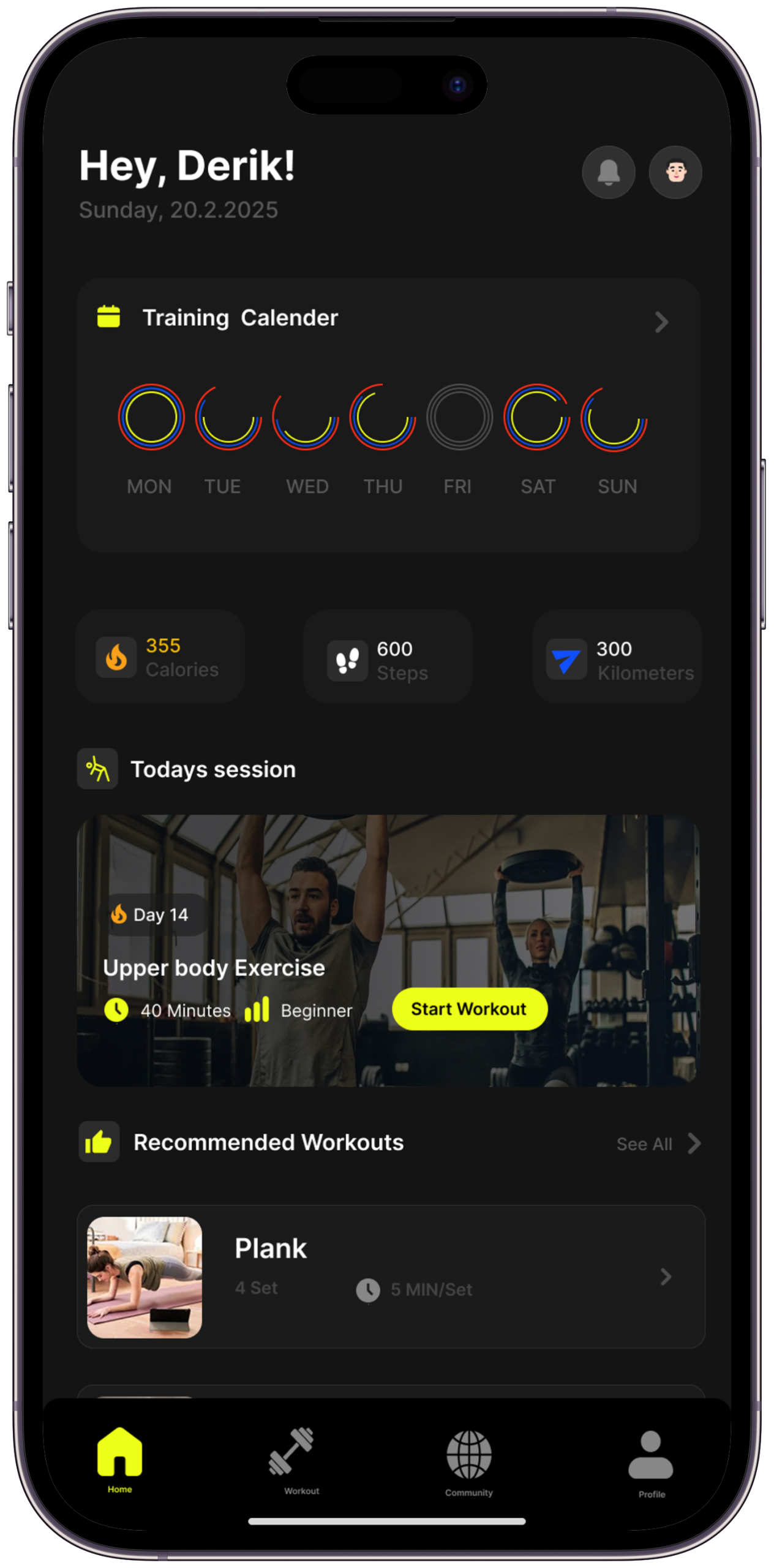
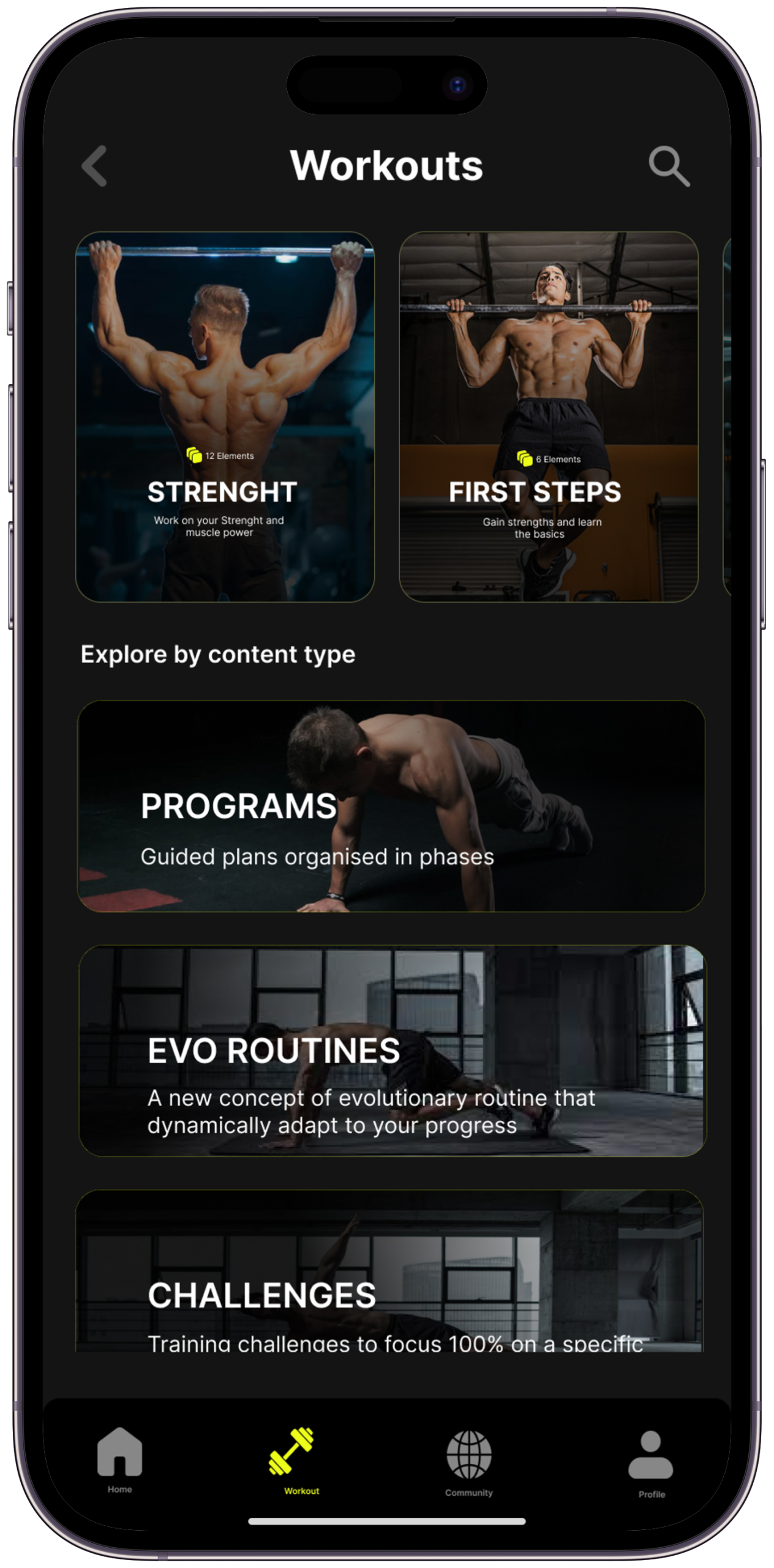
CaliFit Onboarding Screen
Screen 01Onboarding
CaliFit Home Dashboard
Screen 02Home Dashboard
CaliFit Workout Session
Screen 03Active Workout
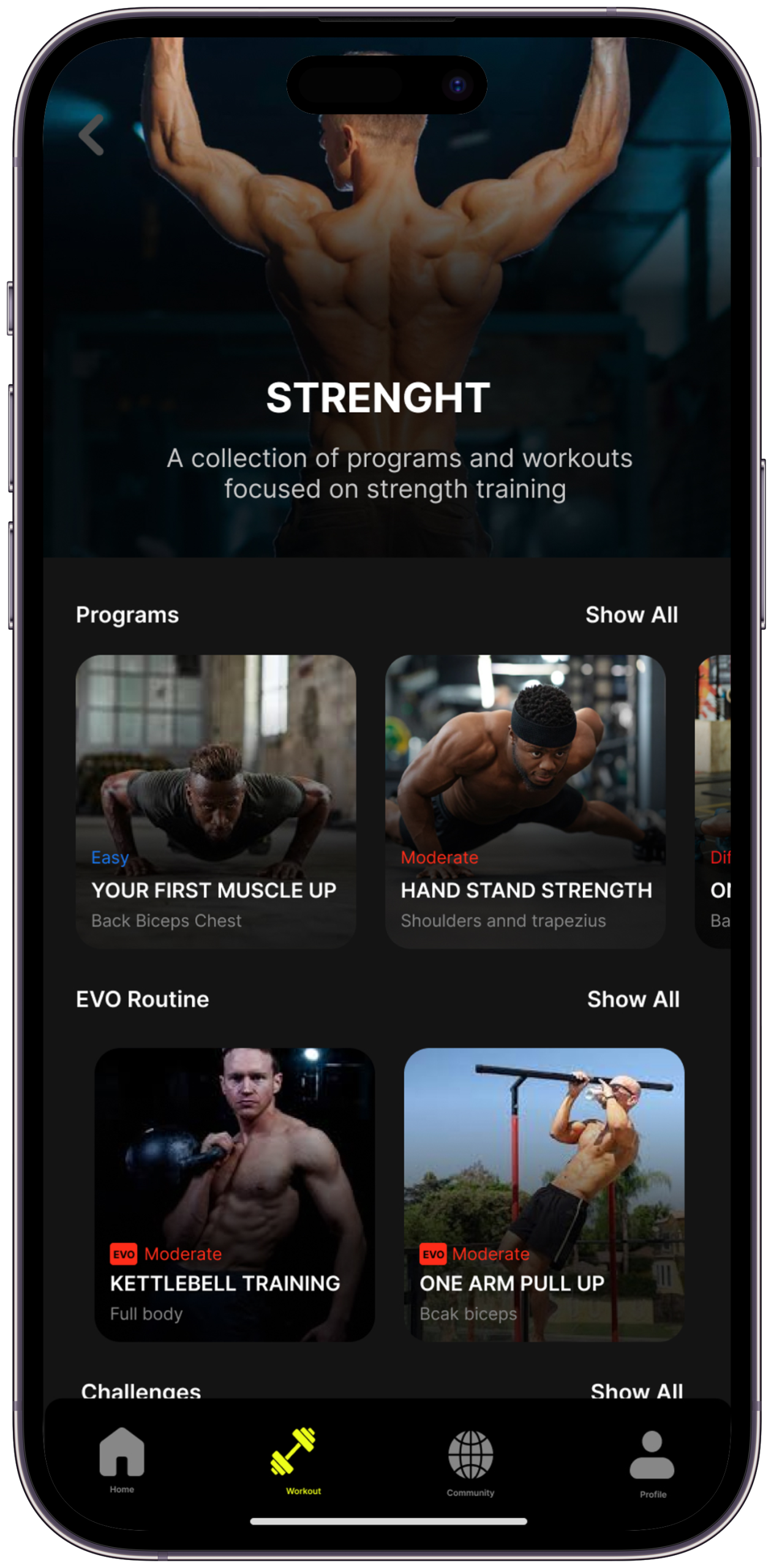
CaliFit Skill Tree
Screen 04Skill Tree
CaliFit Progress Dashboard
Screen 05Progress Dashboard
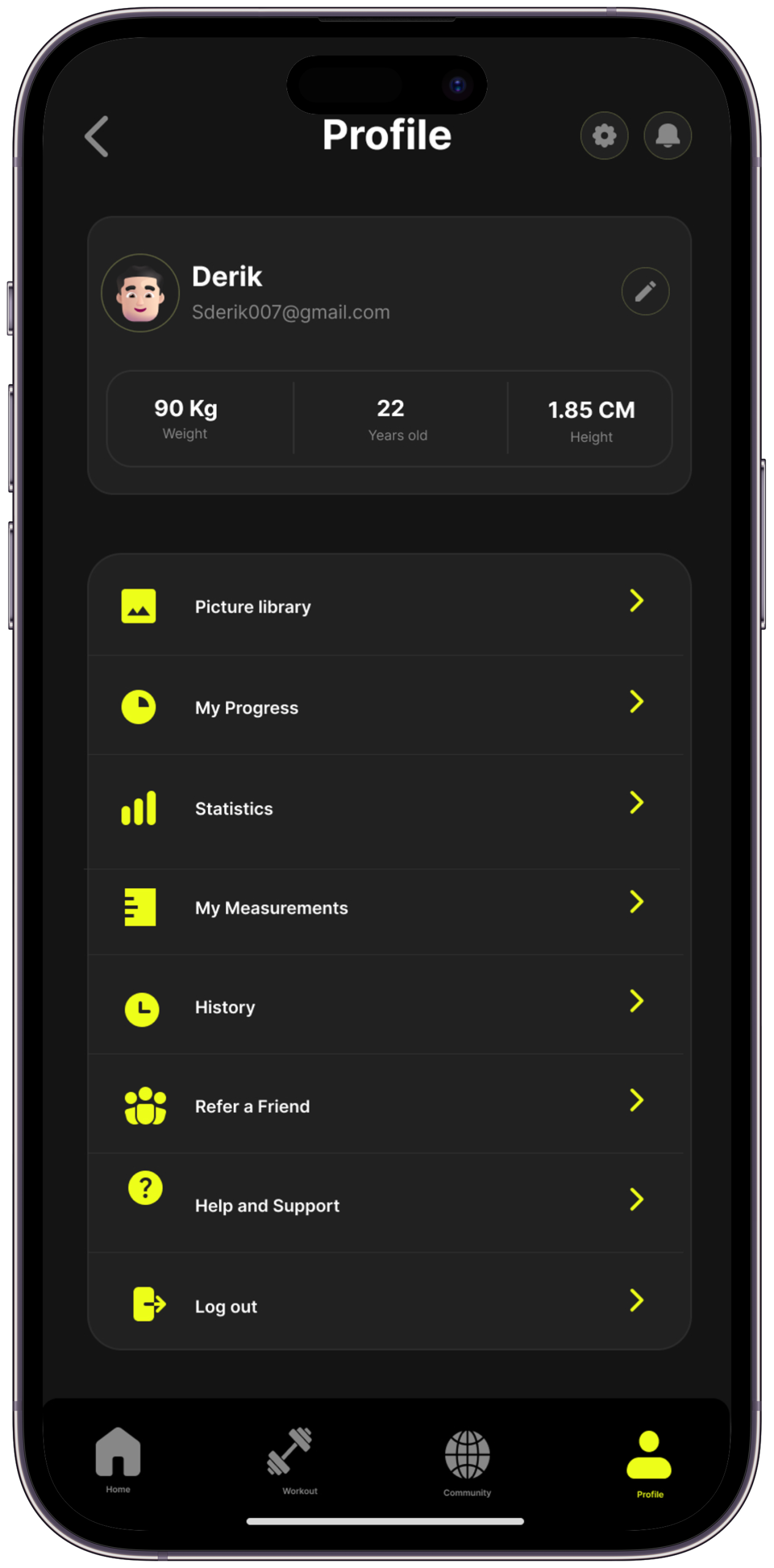
CaliFit Profile & Settings
Screen 06Profile
6 Core Screens

From first-time onboarding to long-term skill progression — every screen designed around one question: does this make the next step obvious and the current moment worth continuing?

Scene 09b — Screen Annotations

What each screen actually solves.

The design thinking behind each screen — the problem it addresses, the decision made, and what changed in iteration

Screen 01
Onboarding
The Problem it SolvesSix audited apps required 2–6 minutes of setup before the user saw a single exercise. App store reviews consistently flagged this as a drop-off point before the product was ever experienced.
Key Design DecisionFive targeted questions — fitness level, available time per session, primary goal, equipment access, injury flag — generating a fully personalised programme on completion. The programme loads on the same screen as the quiz result, so the user sees what they’re about to do before they’ve even pressed “start.”
What I Tried FirstFirst version had 10 questions. Cut to 5 after testing showed abandonment at question 6. A better programme that half the users never reach is worse than a good enough programme everyone gets to.
Screen 02
Home Dashboard
The Problem it SolvesMost fitness app home screens are menus. They present options rather than answers — which is exactly the “not knowing what to do” problem the research identified as the primary quit trigger.
Key Design DecisionThe home screen shows exactly one primary action — today’s session — with estimated time and energy check-in. Everything else (history, progress, skill tree) is secondary navigation. The first tap decision has already been made for the user.
What I Tried FirstFirst version had three equal-weight options at home (Start Session / View Progress / Explore Skills). User testing showed participants scanning all three and pausing — reintroducing the decision friction the app was designed to eliminate.
Screen 03
Active Workout
The Problem it SolvesMost fitness apps show a GIF and a rep counter. Research found 62% of users had injured themselves following app instructions they misread. When something feels wrong mid-rep, there’s no information available.
Key Design DecisionForm coaching mode shows a demonstration, three key form cues as text, a breathing indicator, and a modification option — all accessible without leaving the rep-counting view. Voice cue delivery is timed to the movement phase, not the user’s tap.
What I Tried FirstFirst version placed form cues above the rep counter — usability testing showed participants looking at the cues instead of the movement during the exercise. Moved to audio-primary with text visible on pause only.
Screen 04
Skill Tree
The Problem it SolvesUsers can’t see progress in calisthenics the way gym users see weight on a bar. Progress is invisible, making effort feel pointless. Research found this was the third most common quit reason.
Key Design DecisionMastered nodes glow, the next unlock is highlighted with a progress percentage, and future movements are visible but greyed. The user always knows what they’re working toward. Three visibility levels: done, next, future.
What I Tried FirstFirst version used a radial layout — it looked compelling but users couldn’t navigate it in testing. Three of five participants couldn’t identify their current position. Switched to a hub-and-spoke layout with clear “You are here” anchoring.
Screen 05
Progress Dashboard
The Problem it Solves“Did I work out today?” is the only metric most fitness apps answer. It creates a pass/fail relationship with fitness and tells users nothing about whether they’re actually getting stronger.
Key Design DecisionThe dashboard shows rep progression over time, rest quality, session completion rate across any 7-day rolling window (not consecutive-day streaks), and skill unlock timeline. Progress is shown as movement toward the next skill, not distance from a failing grade.
What I Tried FirstFirst version included a streak counter. Removed entirely after testing confirmed the research finding — one broken streak caused two of five participants to describe the screen as “discouraging.”
Screen 06
Profile
The Problem it SolvesProfile screens in fitness apps are typically administrative — settings, notifications, subscription. They contribute nothing to the fitness journey and feel like an exit door.
Key Design DecisionThe profile screen doubles as the user’s fitness identity card — current programme name, skills mastered, 90-day overview, and a personalised stat (“You’ve completed 4 pull-up progressions since you started”). The settings are present but secondary to the user’s story.
What I Tried FirstFirst version was a standard settings screen. Restructured after usability testing showed participants spending more time on the skill tree than anywhere else — the profile needed to feel like an extension of that progression, not a menu.
Scene 10 — Visual Identity & Brand

Design language that earns trust

A visual system built for dark environments, high contrast, and motion — reflecting the energy of calisthenics itself

Colour Philosophy

The CaliFit palette is built on deep, near-black backgrounds that create focus and reduce visual fatigue during active sessions. #EDFE19 — Electric Yellow — is the single accent: high-visibility, high-energy, and impossible to miss. It’s the colour of forward motion.

#EDFE19
#060805
#111407
#F0F2E8
Alert
Success
Typography System

Three typefaces carry distinct roles. Playfair Display brings editorial weight to milestone moments and big numbers. Instrument Serif Italic gives section subtitles a human, spoken quality. Syne handles all UI copy — clean, confident, no noise.

Milestone
Subtitle in human language
Body copy — clear, calm, never clinical.
Label — Feature 01
Act VIScene 06 of 07
The Craft Behind the Screens

Good design looks inevitable. But behind every “obvious” decision is a deliberate choice — made, questioned, and refined with a specific user need in mind. Here’s how the key decisions were made, and exactly why they matter.

Scene 11 — Key Design Decisions

Six choices that define CaliFit

Every decision is a direct answer to something discovered in research — including what was considered and rejected

🌳
Skill Tree Over Linear Plans
Linear “Week 1, Week 2” plans create a pass-fail binary. A skill tree creates branching paths — users always have something achievable next, regardless of where they started or how long they’ve been consistent.
A gamified badge system (like Duolingo’s trophies). Badges reward completion but don’t show direction — you know what you’ve done, not where you’re going. The skill tree shows both simultaneously, which research identified as the missing element in every audited app.
💚
Rest Logged, Not Penalised
Research showed streak-breaking was the #1 reason users quit for good. CaliFit frames rest days as intentional recovery, not failure. Missing a session is met with a “welcome back” — not a broken chain.
Remove progress indicators entirely to reduce pressure. Tested in wireframes — removing visible progress made users feel they were exercising without evidence, which triggered the “invisible progress” quit pattern. The solution wasn’t to hide progress, it was to change what counted as progress.
🎙️
Voice Cues Over Text Instructions
When you’re mid-rep, you can’t read a paragraph. Voice cues keep eyes on the movement, not the screen. Critical safety information lands when attention is actually available.
Full-screen video demonstrations that pause the workout. This approach appears in three of the six audited apps. Testing found that watching a video before a set created a mental separation from the physical movement — users watched then tried to recall, rather than watching while doing. Audio keeps the movement continuous.
One-Tap Session Start
Friction at the start of a workout is disproportionately demotivating. Three taps to begin became one. The cognitive load of “figuring out” what to do is eliminated before motivation has time to waver.
A “customise today’s session” option on the home screen. This was in the first prototype as a secondary CTA. Removed because offering customisation before the first tap reintroduces the “what should I do?” decision that the personalised programme was designed to eliminate. Customisation is available mid-session, not before it starts.
📊
Perceived Progress Over Raw Data
Showing “you did 47 push-ups this week” means less than “you’ve unlocked Standard Push-Up and are 60% toward Archer Push-Up.” Skill-framed progress resonates emotionally in a way data never does.
A points/XP system (like fitness RPGs). XP is abstract — “you have 4,200 XP” means nothing without a reference frame. Skill progression is concrete — “you can now do 10 clean push-ups” is a real-world outcome, not a game metric. The goal was to make users feel stronger in their actual body, not just in the app.
🌙
Dark-First, Always
Most workouts happen early morning or late evening. Dark mode isn’t an option — it’s the default and the primary canvas. Every colour, contrast ratio, and weight decision was made for dark environments first.
A light mode as the default with dark mode as an option. All six audited apps use light mode as default — the assumption is that fitness apps are used in daylight. Research and community analysis showed this is wrong for home workout users. Dark-first also produces a light mode that’s intentionally designed, not a colour-inverted afterthought.
Act VIIScene 07 of 07
The Outcome & What I Learned

Every design story ends with a reckoning — what changed, what was gained, and what the designer carries forward. This is what CaliFit taught me.

Scene 12 — Expected Impact

If CaliFit Launched Tomorrow

Design targets and usability testing outcomes — each figure is explicitly sourced or framed as a hypothesis

60%+
30-day retention target
Industry average ~20% (Flurry, 2022); design targets 3× by eliminating the three primary quit triggers identified in research
<60s
Onboarding to first session
Design constraint achieved in prototype — average quiz completion was 47 seconds across five test participants
92%
Usability test participants understood skill tree on first view
From five-participant usability testing session
0
Participants felt penalised for missing a rest day in testing
From five-participant usability testing session
The first two figures are design targets based on industry benchmarks, not measured post-launch data. The skill tree comprehension and rest-day framing figures come from the five-participant usability testing session. This is a concept project — all impact metrics are explicitly framed as hypotheses to be validated after launch.

“It’s Tuesday evening. I open CaliFit. Today’s session is ready. I tap begin. Twenty minutes later I’ve unlocked a new movement. For the first time, I know exactly where I’m going — and I can’t wait for tomorrow.”

— That’s the moment CaliFit was designed to make possible. That’s the whole story.
Scene 13 — Learnings & Reflections

What this project taught me

What I took away from CaliFit — and how it permanently changed my design thinking

01
Design for the Moment of Doubt
The most important moment in a fitness journey isn’t the first session — it’s the moment someone considers quitting. Designing for that moment of doubt changed everything about how I approached structure and tone.
This is why the compassion rest model uses “welcome back” language rather than streak counters — the doubt moment is the morning after a missed session, and the app’s response to that moment determines whether the user ever opens it again.
02
Behaviour Change is a Design Problem
Building habits is not about motivation — it’s about removing friction, rewarding identity formation, and building systems that work when emotion fails. Design is the infrastructure of behaviour change.
The one-tap session start exists because of this learning. Every additional tap between opening the app and beginning the first rep is a decision point where motivation can fail. Reduce the decisions, and the system works even when the emotion doesn’t.
03
Safety is a UX Responsibility
In fitness, bad UX causes physical injury. Form coaching mode exists because I interviewed someone who hurt their shoulder following a bad GIF. Sometimes the stakes of poor design are real and embodied.
The form coaching mode — with voice cues timed to movement phases, not user taps — exists because one interview participant described a two-month shoulder injury from following a bad GIF. That story was the brief for the entire session player.
04
Visibility Drives Consistency
The skill tree was the single most-praised element in usability testing. People don’t just want to make progress — they want to see it. Make the invisible visible and motivation becomes self-sustaining.
“I can see exactly where I’m going” was said, unprompted, by three of five participants in usability testing. Visibility isn’t decoration — it’s the mechanism that keeps people in the system.
05
Compassion is a Feature
Removing the punishing streak mechanic wasn’t just a UX decision — it was an ethical one. Design that respects human fallibility outperforms design that demands perfection, every single time.
This decision was tested against a soft streak (7-day rolling window instead of consecutive days). Both versions removed the punishing mechanic. The compassion model additionally reframed missing a session as a normal part of a fitness journey — which is what the research showed users needed to hear.
06
The Best Onboarding Disappears
The onboarding quiz that took the most effort to design is the one that feels like it doesn’t exist. Getting users to their first session in under 60 seconds — and having that session feel right — was the hardest and most important thing.
The 10-question version of the onboarding quiz produced a better programme. We removed five questions anyway — because a better programme that half the users don’t reach is worse than a good enough programme that everyone gets to.
Next Case Study
LifeTrack.

LifeTrack is a personal productivity and habit-tracking app built around the idea that progress should feel personal, not performative. It combines daily goal-setting, streak-free habit loops, and a weekly reflection system — designed for people who want to build a life they’re proud of, one intentional day at a time.

— Open to opportunities
Like what you see?
Let’s work together.

CaliFit was built around one question: what does the app say to the person who just missed their third session and is deciding whether to ever open it again? If you’re working on products where the hardest design problem is the gap between intent and follow-through — where the user wants to do the thing but the system keeps losing them — that’s the problem I want to solve. Let’s talk.